


Connect your SumUp terminal
If SumUp is available in your country, your card payments are matched to your invoices automatically. Five minutes, once.
Before you start
- An active SumUp account, with your login details.
- Being the owner of the shop in Fixara.
You already take card payments on your terminal. What Fixara removes is not your way of taking payment: it is the re-keying, and the till discrepancy that always turns up on a Saturday night.
What Fixara does, and what it doesn’t
Fixara reads the history of your payments and matches them to your invoices. It triggers no payment, does not touch your money (it goes straight from your customer to your SumUp account) and takes nothing from it.
Open “Mes branchements”
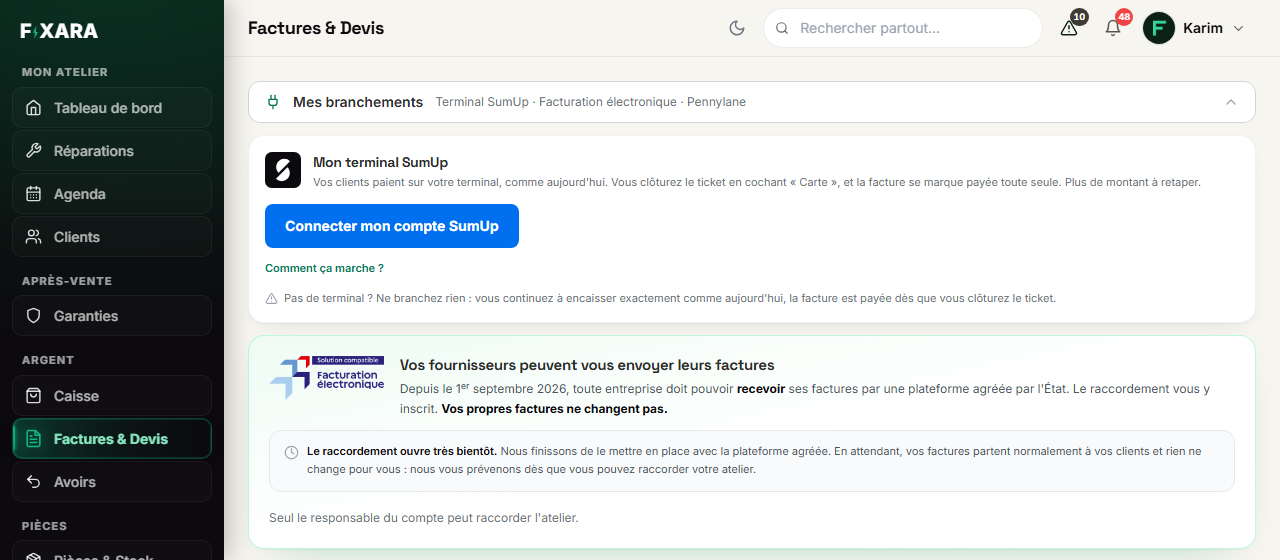
In Invoices & Quotes, unfold Mes branchements (My connections), at the top. The first card is Mon terminal SumUp (My SumUp terminal). Click Connecter mon compte SumUp (Connect my SumUp account).
 1234
12341Your connections, folded away at the top of Invoices & Quotes.
2You allow Fixara to read your payments.
3The details of what happens next.
4No terminal? Nothing to connect.
The card doesn’t appear at all? Contact support: the connection is not open on your account.
Allow access on SumUp
You land on SumUp: log in with your usual details, and accept. Fixara only asks for what it needs: read your transaction history, your merchant profile and your terminals. Not your bank details, not your catalogue. You then come back to Fixara, connected.
Take payments as before
At the counter, nothing changes: you type the amount on your terminal, the customer pays, and in Fixara you take payment for the ticket by ticking Carte (Card). The invoice is issued “to be paid”, then switches automatically to “Paid” as soon as Fixara finds the payment at SumUp, usually within a minute. The transaction reference stays attached to the invoice.
A payment Fixara could not match
Two invoices for the same amount on the same day, a sale with no invoice: when in doubt, Fixara does not guess. The payment is shown in the SumUp card, with its time and the last four digits of the card: you attach it to the right invoice in one click, or you dismiss it (counter sale, deposit).
A refund made on SumUp comes through automatically
If you fully refund a customer from SumUp, Fixara notices it and issues the credit note that cancels the invoice. A partial refund is recorded and flagged, without issuing anything: it is up to you to say what is cancelled.
You’re done when you see this
- The SumUp card shows your account connected.
- After a card payment, the invoice switches to “Paid”, with a SumUp reference under the payment method.
- Nothing is left “to attach” at the end of the day, or you know why.