


Set up your VAT, and what happens on each line
Two default rates, editable line by line. And what the small-business VAT exemption changes.
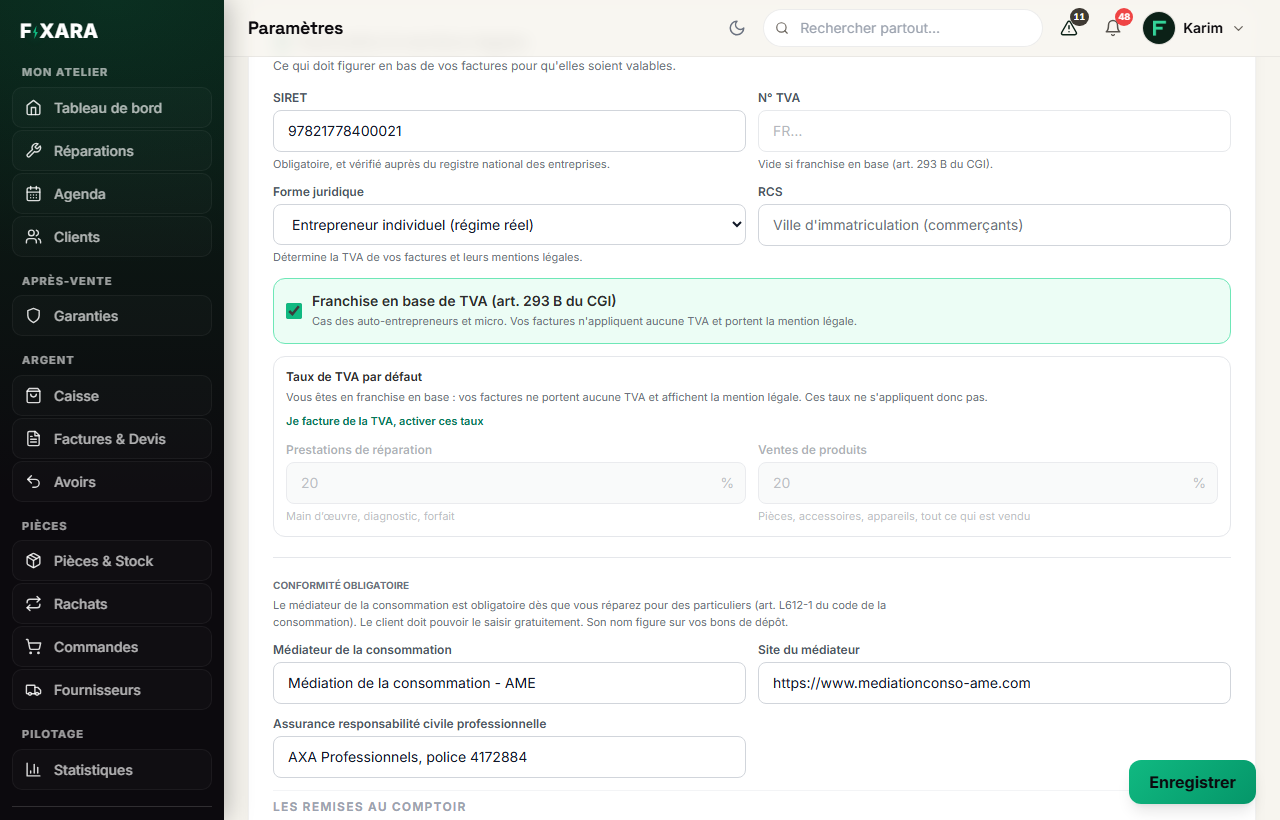
Everything is set in Settings, Mon activité tab (My business), in the Facturation & mentions légales (Invoicing & legal notices) block.
 123
1231The legal form decides the legal notices.
2Ticked: no VAT, and the exemption notice (art. 293 B in France) is added automatically.
3Your two default rates, if you charge VAT.
If you are VAT-exempt
Leave Franchise en base de TVA (VAT exemption) ticked: no VAT is charged, and the legal notice for your country (in France, “TVA non applicable, art. 293 B du CGI”) is printed automatically on your documents. There is nothing else to set.
If you charge VAT
Click Je facture de la TVA, activer ces taux (I charge VAT, enable these rates), then set your two default rates: one for repair services (labour, diagnosis, flat rate), one for product sales (parts, accessories, devices). You need two because the same invoice almost always carries labour and a part.
Also set the frequency of your returns (monthly, quarterly or simplified scheme), and tick VAT on debits if you have chosen it: the notice is printed on your invoices. These two options are French and only appear for a shop in France.
- You type the rates you want: no value is imposed on you. Your country’s rates are suggested in the field, simply as a shortcut.
- These are only starting values: when taking payment, each line remains editable, and an invoice can carry two different rates.
- Invoices already issued do not change when you edit these settings: the rate is fixed on each document on the day it is issued.
The rate that applies to your business is up to you and your accountant
Not to Fixara. Charging VAT when you are not liable for it makes it payable, just because you wrote it. If in doubt, ask your accountant before your first invoice.