


Step 4 of 4
The final check: are you really ready?
Seven checks to do once, so you don’t discover a gap on a document already handed to a customer.
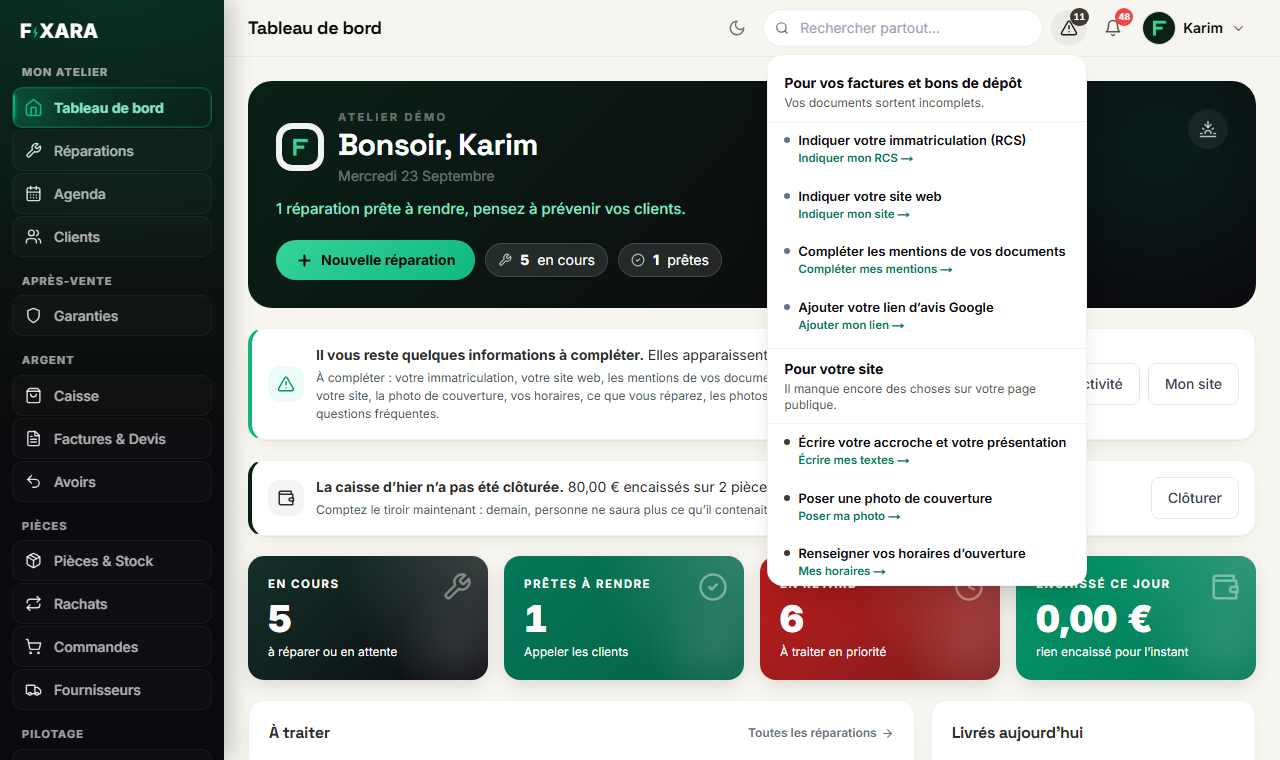
Fixara itself keeps track of what’s missing: the triangle at the top of the screen and the banner on your dashboard name each empty field, with a link to it. Here’s how to check for yourself, in order of importance.
 12
121No more number on the triangle: nothing is missing any more.
2This part must be empty before your first customer.
- 1A drop-off receipt: open a ticket,
Imprimer(Print), then Bon de dépôt (Drop-off receipt). Read the header: name, address, company number, your signature, your mediator (France) and your terms and conditions must all be there. - 2A test quote: in Invoices & Quotes, create a quote with a part and some labour, then open its PDF. Header, mentions, your quote terms: all there? You can then delete it.
- 3Your VAT rates: on this quote, is the rate correct? If you are VAT-exempt in France, the mention “TVA non applicable, art. 293 B du CGI” must appear (in other countries, your country’s exemption mention).
- 4The check-in e-mail: create a ticket with your own address as the customer, and read what a customer receives.
- 5Your Google review link: pasted in Settings, Ce que l’outil fait sans vous (What the software does without you) block, it shows a QR code at the end of every payment and adds a button to the payment receipt.
- 6Your terms of sale: they are printed on the drop-off receipt and on invoices. Without them, you have nothing in writing in case of a dispute.
- 7Your team, if you don’t work alone: each person has their own account (Équipe (Team) tab in Settings), so every action has an author.
Don’t create an invoice “just to see”
An invoice takes a number in your series as soon as it is created, even as a draft. Deleting it leaves a gap in a series that must stay continuous. To check the layout, always use a quote: it has its own series.
The test that beats all the others
Do a pretend repair from start to finish, with your own e-mail address: check-in, move to Ready, payment, invoice. Twenty minutes, and you’ll know the product better than any guide can teach you.
Taking payment in this test issues a real invoice
A paid invoice takes a number in your series and can no longer be deleted: that’s the law. To cancel the one from your test, issue a credit note from the invoice. If you want to avoid any document at all, stop the test before taking payment.