


Letting the customer know by text that the device is ready
One text message, just one, sent by hand. How to switch it on, what it costs, and why there is only one.
Before you start
- Having bought SMS credits: they are not included in the subscription.
Text messages are sold separately, because each one costs money to send. The subscription pays for the software; text messages are topped up in advance. Nothing expires, nothing is reset on the 1st of the month.
Buy credits
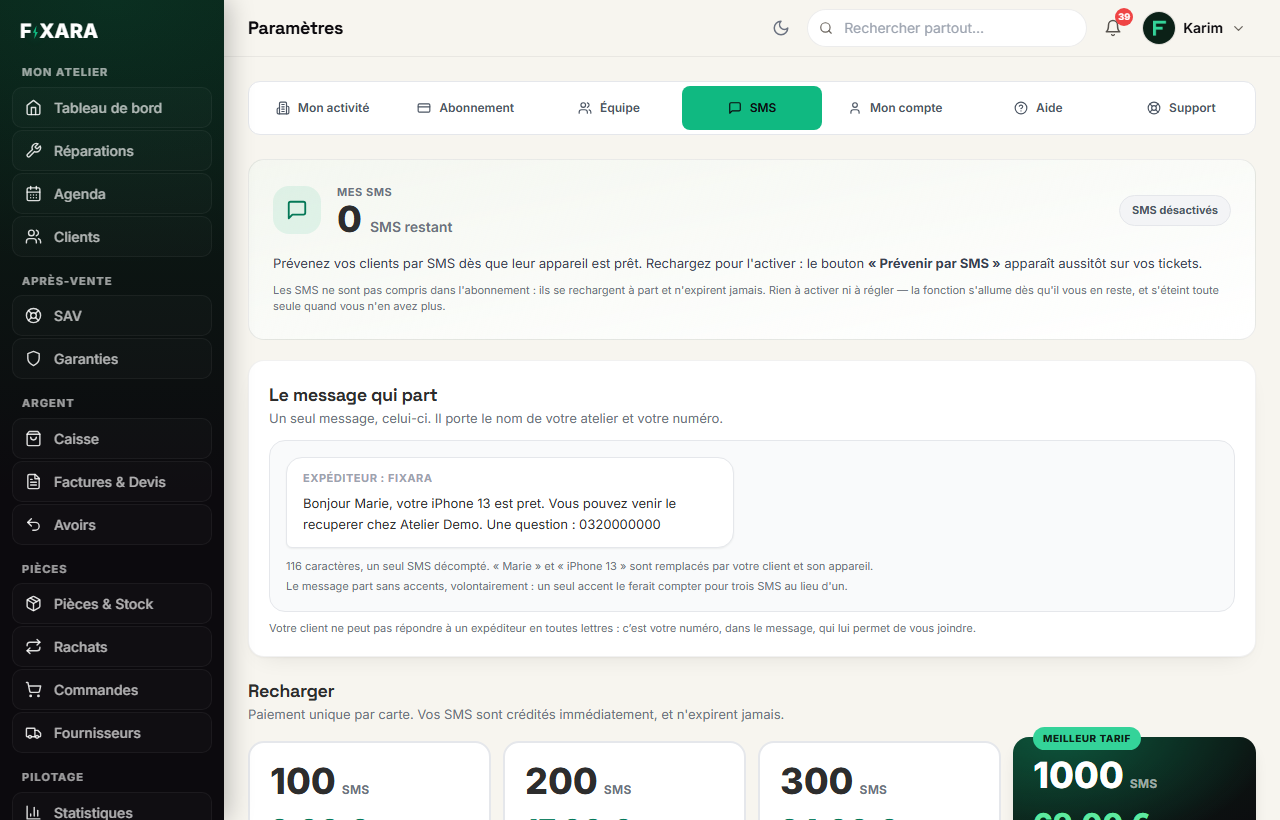
Settings, SMS tab. At the top, your balance. In the middle, the exact message that goes out, with an example. At the bottom, four packs: 100 texts for €9, 200 for €17, 300 for €24 and 1,000 for €69. One click on Choisir (Choose), payment is by card, and the balance is credited within a second.
 12345
123451The SMS tab.
2Your balance: it is what makes the send button appear on your tickets.
3The exact message, with its number of characters.
4Four packs, paid once, which never expire.
5The cheapest per text.
There is no “switch on text messages” toggle
The balance is the switch. As soon as you have texts left, the Prévenir par SMS (Notify by SMS) button appears on your tickets; at zero, it disappears.
Send it, from the ticket
On the record of a ready repair, Prévenir par SMS (Notify by SMS). Sending is always manual: unlike the e-mail, no text goes out by itself when a ticket moves to “Ready”.
The text goes to the ticket’s contact number if it is filled in, otherwise to the phone on the customer record. The button shows the number it targets, and the confirmation repeats it.
The text, and why it cannot be edited
“Bonjour {prénom}, votre {appareil} est prêt. Vous pouvez venir le récupérer chez {boutique}. Une question : {téléphone}” (Hello {first name}, your {device} is ready. You can collect it at {shop}. Any question: {phone}). About 115 characters with real values, so a single text. If the shop’s phone number is not filled in, the last sentence changes.
An accent triples the price of a text
A single character outside the SMS alphabet (an “é”, a curly apostrophe, the € symbol) drops the length of a text from 160 to 70 characters: a 160-character message then goes out as three texts. So Fixara removes accents when sending. That is also why the text is fixed.
The text did not go out
Fixara never writes “sent” when sending failed: the ticket history records the failure, and no credit is used. The two common causes: no credits left (the button disappears), or a number that is not a valid mobile.
You’re done when you see this
- The balance went down by 1 after sending.
- The ticket history shows the line « SMS envoyé » (Text sent) with the number.
- Your customer sees
FIXARAas the sender. It is a name, not a number: they cannot reply, hence your phone number in the text.