


Credit notes, vouchers and loyalty: which to choose
Three tools that look alike and do not do the same thing to your turnover.
| The tool | What it does |
|---|---|
| Credit note | You give back money on a past sale. A numbered credit note is issued: your turnover goes down at that moment. So there must be an invoice to match. |
| Voucher | A gesture for next time. Nothing leaves your turnover: it is a deferred discount, which will appear as a negative line on the invoice where it is spent. |
| Loyalty points | Earned automatically by the customer with each payment. They convert in whole tiers when taking payment, and then create a real voucher, so the discount has a document behind it. |
Create a credit note
In Credit notes, + Avoir (+ Credit note). A banner reminds you what the action does: it issues a credit note. Then:
- the customer: type their name, and their invoices and sales appear; choose the one the credit note relates to;
- the amount, which cannot exceed what is left to give back on that invoice, and the reason (product return, goodwill gesture, invoicing error, after-sales, other);
- what happens next: the customer keeps a credit for their next visit (nothing leaves the till), or cancel the whole invoice (error, duplicate or refund: the amount leaves your turnover and the till).
Then Créer l’avoir (Create the credit note).
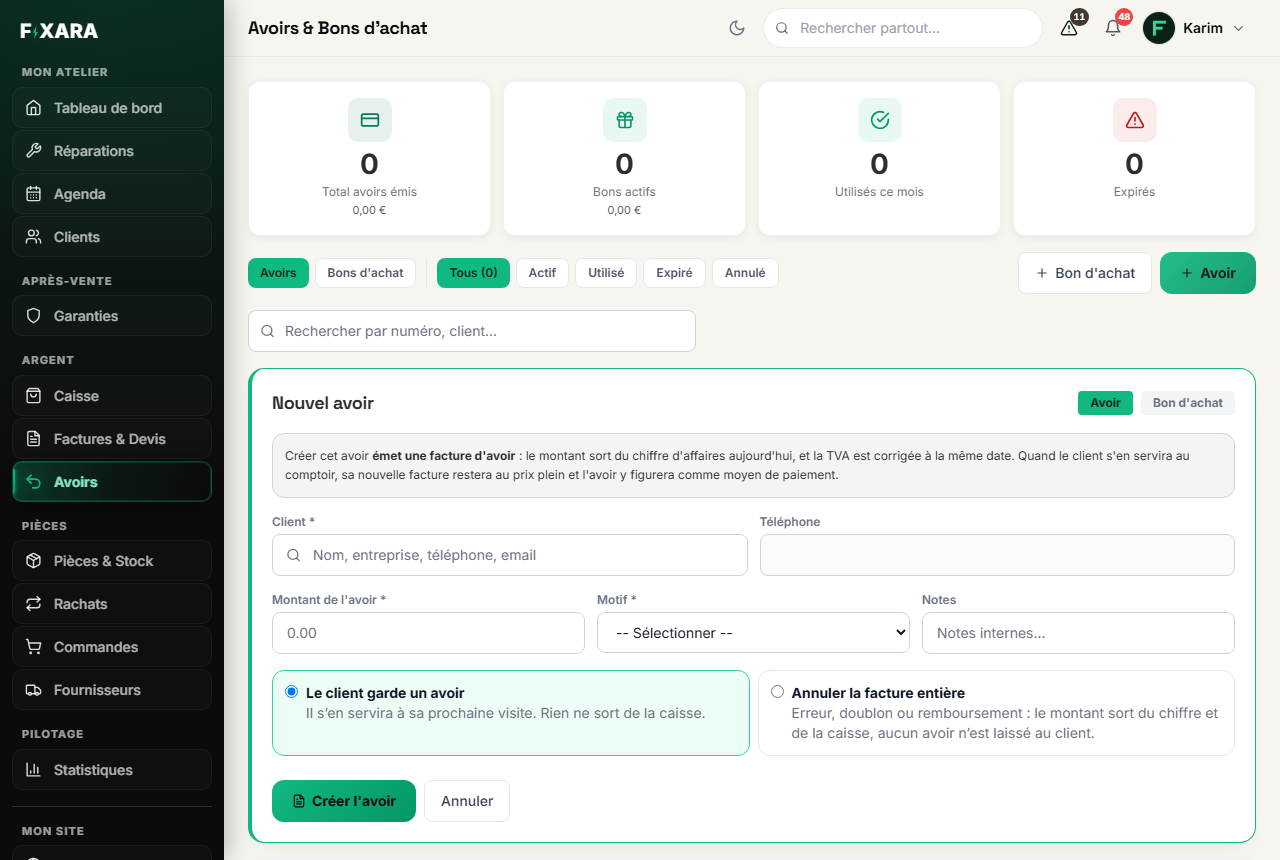 123456
1A credit note, or a voucher: two different actions.
2What the action really does, stated before you do it.
3The customer first, then the invoice concerned.
4No more than what is left to give back on this invoice.
5They will use it on their next visit.
6The sale is cancelled, the money leaves the till.
To cancel a whole invoice, there is a shorter way: the Émettre un avoir (Issue a credit note) icon on its line, in Invoices & Quotes. The original invoice is kept, and a credit note reverses it.
A credit that is used is not deducted twice
When the customer comes back and uses their credit, their new invoice stays at full price and the credit appears on it as a payment method (“Réglé par avoir”, Paid by credit note, then “Net payé”, Net paid). The amount already left your turnover on the day the credit note was issued.
Give a voucher
Still in Credit notes, + Bon d’achat (+ Voucher): the customer, the amount, the reason (loyalty, commercial, compensation, other). No invoice is issued: it is a discount they will use on their next visit.
Set up loyalty
In Customers, the Fidélité (Loyalty) block: tick Accorder des points à mes clients (Give points to my customers), then set the points per euro spent, the tier (how many points are needed) and what it is worth in euros. By default, 100 points are worth €10.
Credit notes, vouchers and points appear in the payment window, to tick one by one in front of the customer. Nothing is applied automatically: it is their money.