


What goes out to your customer by itself
Three automatic e-mails, which you can switch off one by one. Everything else waits for you to act.
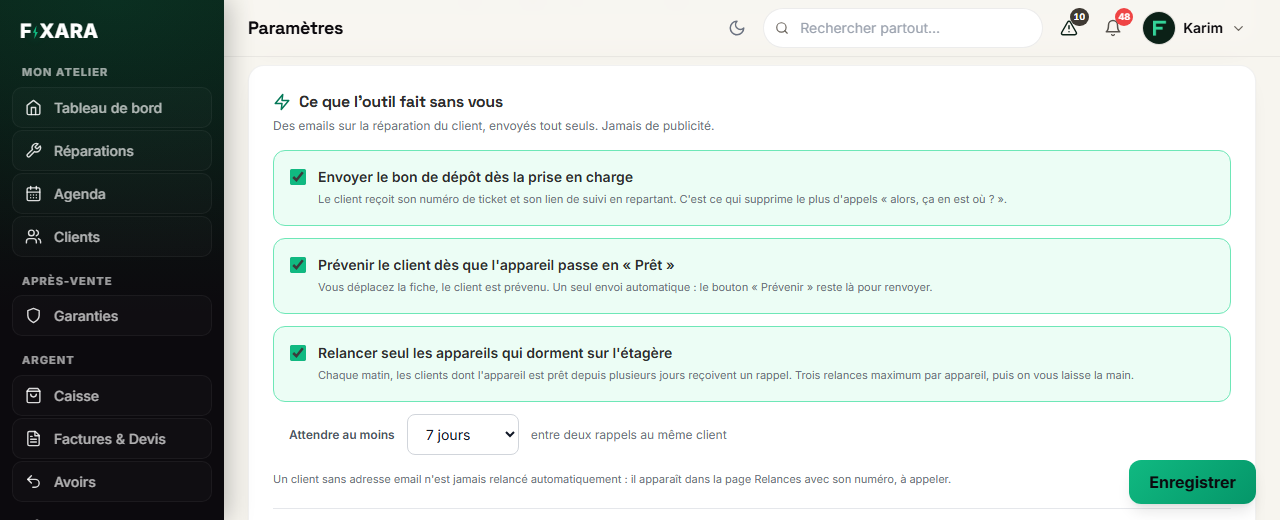
We do not fill your customers’ inboxes on your behalf. Three e-mails go out by themselves, and you choose which ones, in Settings, Ce que l’outil fait sans vous (What the tool does without you) block.
 1234
12341At check-in: the ticket number and the tracking link.
2When moved to “Ready”: your device is waiting for you.
3A ready device left waiting: a reminder, three at most.
4The time between two reminders to the same customer.
| When | What the customer receives |
|---|---|
| At check-in | “Your device has been checked in”, with its ticket number and tracking link. The PDF drop-off receipt is attached only if it has been signed. |
| When moved to « Prêt » (Ready) | “Your device is ready”, inviting them to come and collect it. The Prévenir le client (Notify the customer) button on the ticket lets you send it again. |
| If the device is not collected | A reminder each time the chosen delay has passed, three at most for the same device. A customer without an e-mail address is never reminded automatically. |
What about the invoice?
It is always issued automatically when you take payment: that is the law. It is only sent if you decide so: at the end of the payment, a window offers Envoyer la facture par mail (Send the invoice by e-mail) and Imprimer la facture (Print the invoice). You can also send it later from Invoices & Quotes.